Instalaremos como ejemplo un SAI Yukai PowerMust 600 con conexión al puerto serie y conexión USB.
Instalamos el sistema nut (Network UPS Tools):
# aptitude install nut
Si instalamos el SAI en un puerto USB, además:
# aptitude install nut-usb
Si instalamos el SAI en un puerto serie autorizamos al usuario nut el acceso al mismo:
# adduser nut dialout
Configuramos el demonio nut:
# vi /etc/default/nut
# start upsd
START_UPSD=yes

# set upsd specific options. use "man upsd" for more info
UPSD_OPTIONS=""

# start upsmon
START_UPSMON=yes

# set upsmon specific options. use "man upsmon" for more info
UPSMON_OPTIONS=""
Consultamos el controlador que necesitamos para nuestro SAI en la web de Network UPS Tools. Para el SAI del ejemplo necesitamos el controlador “megatec”.
Indicamos al sistema la existencia de nuestro SAI:
# vi /etc/nut/ups.conf
[yukai]
	driver = megatec
	# si usamos puerto serie
	# port = /dev/ttyS0
	# si usamos puerto USB
	# port = auto
	port = xxxxxx
	desc = "Yukai PowerMust 600"
Indicamos al demonio los permisos sobre el SAI (permiso local):
# vi /etc/nut/upsd.conf
ACL all 0.0.0.0/0
ACL localhost 127.0.0.1/32

ACCEPT localhost
REJECT all
Creamos un usuario para gestionar el SAI:
# vi /etc/nut/upsd.users
[yukai_admin]
password = mi_clave
allowfrom = localhost
actions = SET
instcmds = ALL
Y por último configuramos el monitor:
# vi /etc/nut/upsmon.conf
MONITOR yukai@localhost 1 yukai_admin mi_clave master
RUN_AS_USER nut
MINSUPPLIES 1
SHUTDOWNCMD "/sbin/shutdown -h +0"
POLLFREQ 5
POLLFREQALERT 5
HOSTSYNC 15
DEADTIME 15
POWERDOWNFLAG /etc/killpower

NOTIFYMSG ONLINE "UPS: Normal state"
NOTIFYMSG ONBATT "UPS: On battery"
NOTIFYMSG LOWBATT "UPS: Battery low"
NOTIFYMSG FSD "UPS: Starting shutdown"
NOTIFYMSG COMMOK "UPS: Communication restored"
NOTIFYMSG COMMBAD "UPS: Communication lose"
NOTIFYMSG SHUTDOWN "UPS: Shutting down"
NOTIFYMSG REPLBATT "UPS: Replace battery"

NOTIFYFLAG ONLINE SYSLOG
NOTIFYFLAG ONBATT SYSLOG+WALL
NOTIFYFLAG LOWBATT SYSLOG+WALL
NOTIFYFLAG FSD SYSLOG+WALL
NOTIFYFLAG COMMOK SYSLOG
NOTIFYFLAG COMMBAD SYSLOG
NOTIFYFLAG SHUTDOWN SYSLOG
NOTIFYFLAG REPLBATT SYSLOG

RBWARNTIME 43200
NOCOMMWARNTIME 300
FINALDELAY 0
Modificamos los permisos de los ficheros:
- # chown root:nut /etc/nut/*
- # chmod o-r /etc/nut/*
Reiniciamos el servicio:
# /etc/init.d/nut restart
Y verificamos que todo funciona correctamente:
# upsmon status
Network UPS Tools upsmon 2.2.2
UPS: yukai@localhost (master) (power value 1)
Using power down flag file /etc/killpower
Verificamos los procesos en marcha:
# ps aux | grep ups
nut       8513  0.0  0.0   2012   512 ?        Ss   12:01   0:00 /sbin/upsd
root      8515  0.0  0.0   2020   652 ?        Ss   12:01   0:00 /sbin/upsmon
nut       8516  0.0  0.0   2020   688 ?        S    12:01   0:00 /sbin/upsmon
# ps aux | grep nut
nut       8511  0.0  0.0   2012   576 ?        Ss   12:01   0:00 /lib/nut/megatec -a yukai
nut       8513  0.0  0.0   2012   512 ?        Ss   12:01   0:00 /sbin/upsd
nut       8516  0.0  0.0   2020   688 ?        S    12:01   0:00 /sbin/upsmon
Y verificamos que todo funciona correctamente:
$ upsc yukai@localhost
battery.charge: 97.5
battery.voltage: 13.60
battery.voltage.nominal: 12.0
driver.name: megatec
driver.parameter.pollinterval: 2
driver.parameter.port: /dev/ttyS0
driver.version: 2.2.2
driver.version.internal: 1.5.14
input.frequency: 49.9
input.frequency.nominal: 50.0
input.voltage: 209.5
input.voltage.fault: 209.5
input.voltage.maximum: 215.2
input.voltage.minimum: 208.6
input.voltage.nominal: 220.0
output.voltage: 209.5
ups.beeper.status: enabled
ups.delay.shutdown: 0
ups.delay.start: 2
ups.load: 27.0
ups.mfr: unknown
ups.model: unknown
ups.serial: unknown
ups.status: OL
ups.temperature: 25.0
ups.type: standby
Podemos mostrar solo parte de la información:
$ upsc yukai@localhost ups.status
OL
OL indica “On Line power”. Podría indicar por ejemplo OB (“On Battery”) o LB (“Low Battery”).
$ upsc yukai@localhost battery.charge
97.5
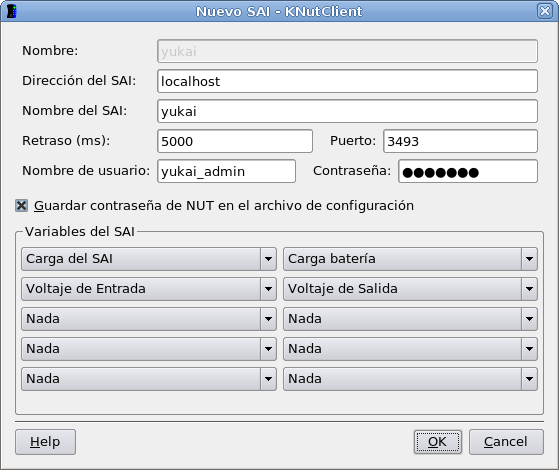
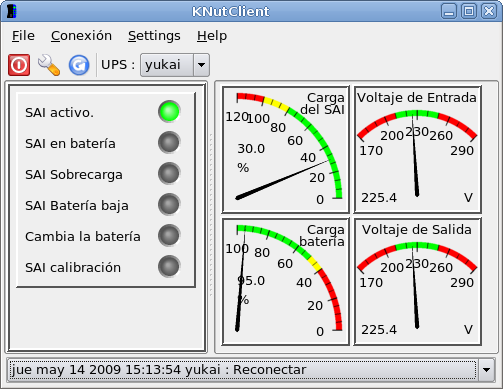
En escritorios gráficos es útil -y muy sencilla- la herramienta “knutclient” que permite monitorizar el SAI:
Referencia
- Documentación de Network UPS Tools
instalar un sai (ups) en Linux, configurar sai en Linux, instalar UPS en GNU/Linux
5 Responses